


The Power of You: Personalizing Copilot for Maximum Impact
Over the past 18 months, as we’ve introduced Copilot features to clients, one question keeps
surfacing: “Can it remember my preferences?”
Well… the answer is now yes. Copilot can remember you, recognize your preferences, and learn from your recent work.
Microsoft 365 Copilot now includes powerful personalization settings designed to make your experience smarter, faster, and more tailored to your workflow. You’ll find these features under Copilot Chat Settings.
✨ Custom Instructions: Your Voice, Your Style
With Custom Instructions, you can guide Copilot to respond in a way that fits your communication style and business needs. Whether you prefer concise summaries, friendly tones, or detailed walkthroughs, Copilot will follow your lead. You can also tell Copilot what it should know about your role, goals, and preferred tools—so it can offer more relevant suggestions from the start.
🧠 Copilot Memory: Smarter Support Over Time
Copilot Memory helps Copilot remember useful details about you and your work—like your favorite formats, recurring tasks, or team context. This means fewer repetitive explanations and more time saved. You’re always in control: you can view, edit, or delete memory items anytime.
💡 Why This Matters for You
These personalization features are game-changers. They help streamline communication, reduce repetitive tasks, and ensure Copilot delivers insights that truly fit your personal context. Whether you’re drafting emails, summarizing meetings, or planning projects—Copilot now works more like a teammate who understands your workflow.
🛠️ Ready to Personalize Your Copilot Experience?
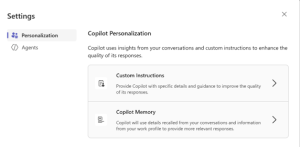
Head to Settings > Personalization and explore Custom Instructions and Copilot Memory today.
-
Go to Copilot Chat
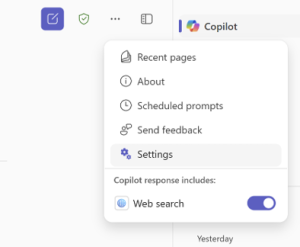
Click the three-dot ellipsis in the top right corner
-
Click Settings
Click Custom Instructions
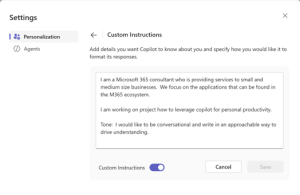
Fill in the fields to tell Copilot: 1.) What it should know about you (e.g., your role, goals, preferred tools) and 2.) How you would like it to respond (e.g., tone, level of detail, format, etc.)
-
Customize Copilot Memory
Select the memories you’d like to keep or remove in Copilot Memory
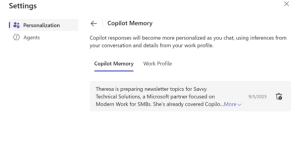
You can also turn the memory feature off completely and/or provide information about your work role.
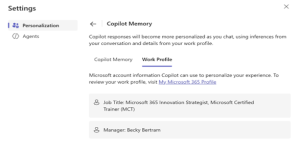
You’re in full control.
With every release of Copilot, more features are being added to make it more customized and aligned with you. Stay tuned as we identify more ways Copilot and AI can be integrated into your daily routines.